NPC
Your browser's NPC. Handles the side quests.
Control your real browser from any IDE - no context switching.
$ npm i -g npc-agent click to copy
Your browser's NPC. Handles the side quests.
Control your real browser from any IDE - no context switching.
You're deep in code and need to message someone on Slack, check Discord, or reply to an email. Every time, you leave your editor, lose focus, and break flow.
Browser automation tools want API keys, OAuth tokens, or separate bot accounts for every service. That's a lot of setup for "send a message."
One CLI + one Chrome extension. Your IDE agent says what to do ("message Anna on Slack"), NPC does it in your real, logged-in browser.
No API keys per service. No OAuth. Uses the browser sessions you already have. Works with any MCP IDE - Cursor, VS Code, Windsurf.
Your IDE handles reasoning. NPC is the hands - it executes browser actions via Chrome DevTools Protocol. No LLM inside NPC.
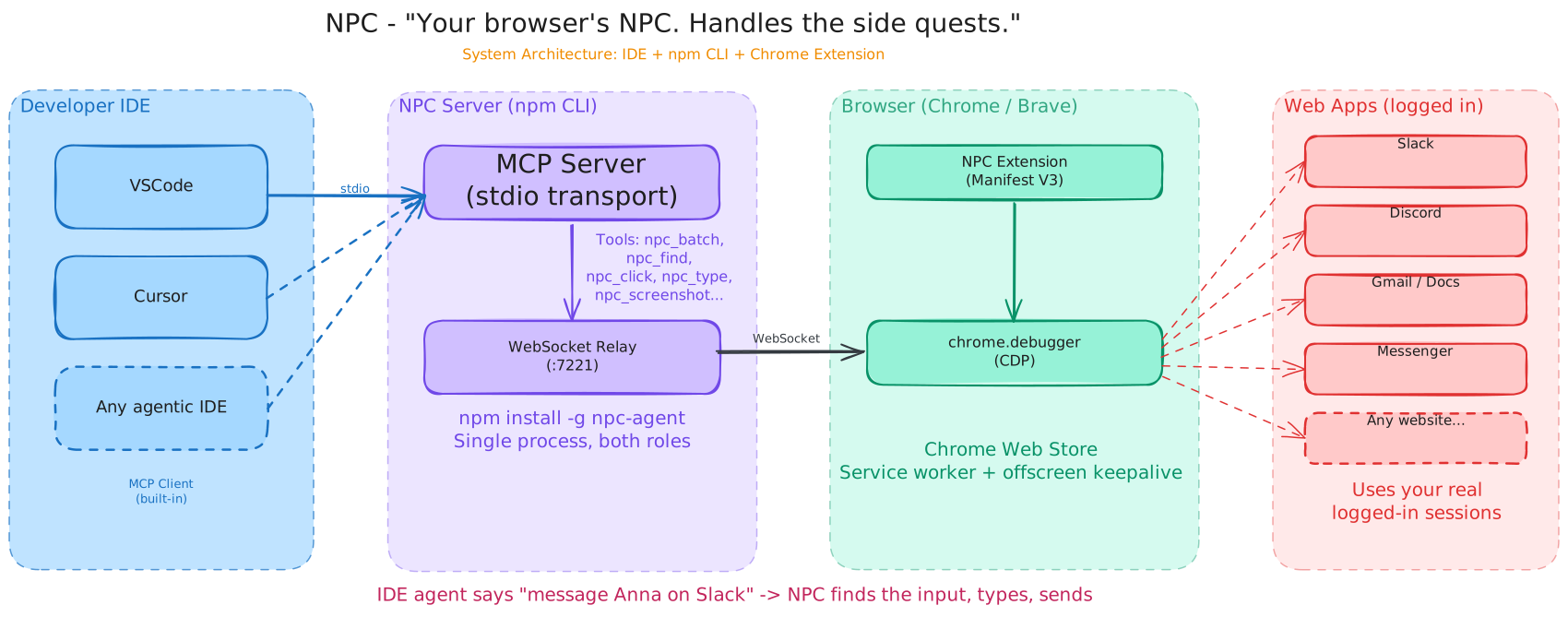
Cursor, VS Code, Windsurf
MCP server + WebSocket relay
chrome.debugger API
Everything you need to read and control a browser tab.
{ "actions": [
  { "action": "find", "selector": "Message Anna" },
  { "action": "click", "x": 450, "y": 320 },
  { "action": "type", "text": "deploy is done" },
  { "action": "key", "key": "Enter" }
]}One MCP call. Four actions. Sub-second execution. No round trip overhead between steps.
npm i -g npc-agent
Open chrome://extensions, enable Developer mode, click Load unpacked, select the extension/ folder.
Add NPC to .cursor/mcp.json or .vscode/mcp.json and start asking your agent to control the browser.